Refunds
Use this page to return money to a customer’s card. The steps depend on how the customer paid. For a PAX or MagTek payment, void it while its batch is open; after the batch closes, use Return Credit.
Choose the payment type
| How the customer paid | Where to start | Card needed for a refund? |
|---|---|---|
| PAX terminal | Open batch: Void Transaction on the order. Closed batch: Return Credit in Staff Self Service. | Yes for Return Credit. |
| MagTek reader | Open batch: Void Transaction on the order. Closed batch: Return Credit in Staff Self Service. | No. |
| Stripe reader or online | Edit > Partial Refund on an eligible order. | No. |
Void Item removes an item from an order. It does not replace a card refund.
PAX terminal
If the batch is still open, open the paid order, reopen it if needed, and tap Pay. Swipe left on the PAX payment and tap Void Transaction. See Void Payment for the full steps.
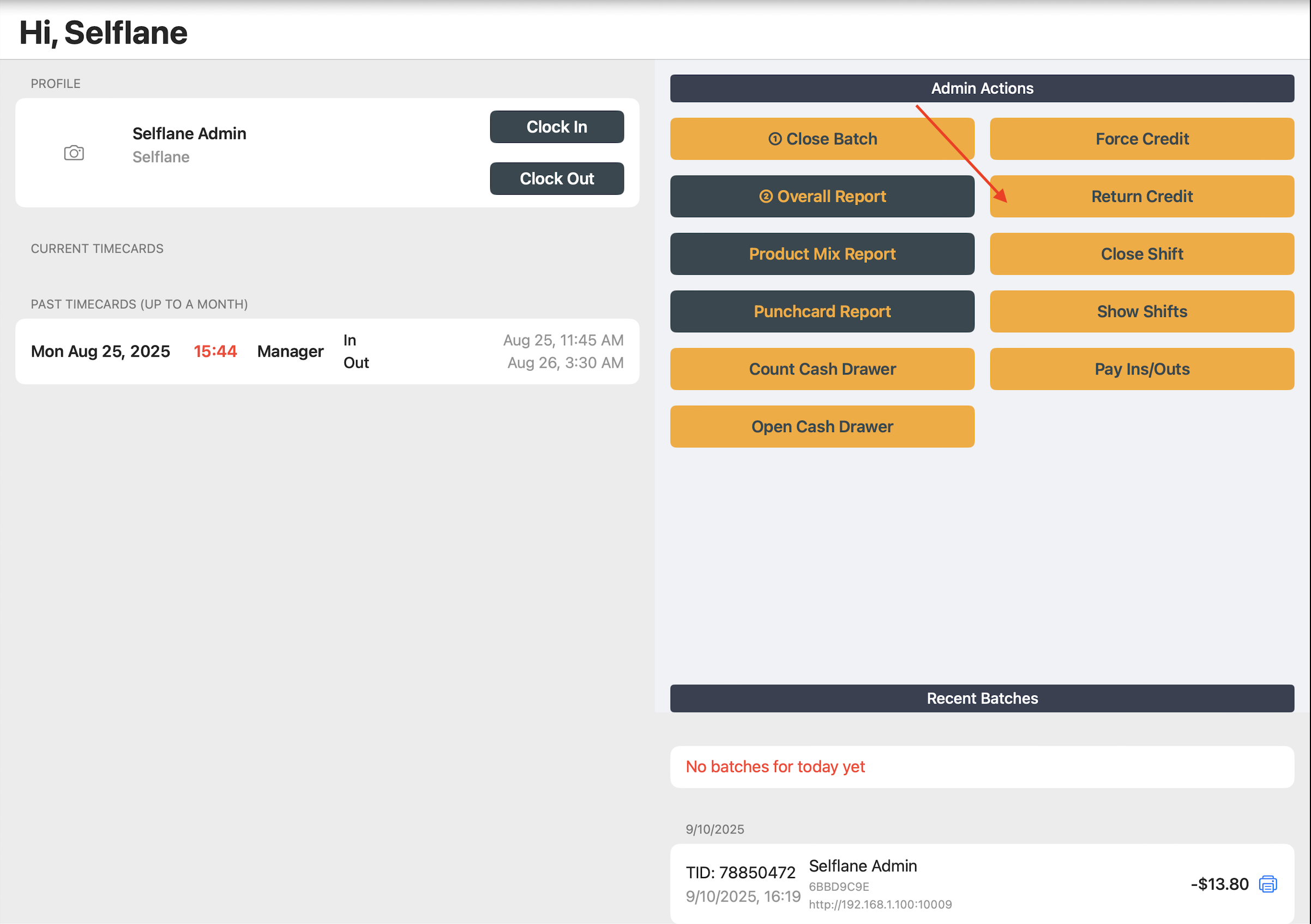
After the batch closes, a manager with admin access can return credit through the PAX terminal:
- Tap
Staff Self Service, select a manager with admin access, and enter the passcode. - Tap
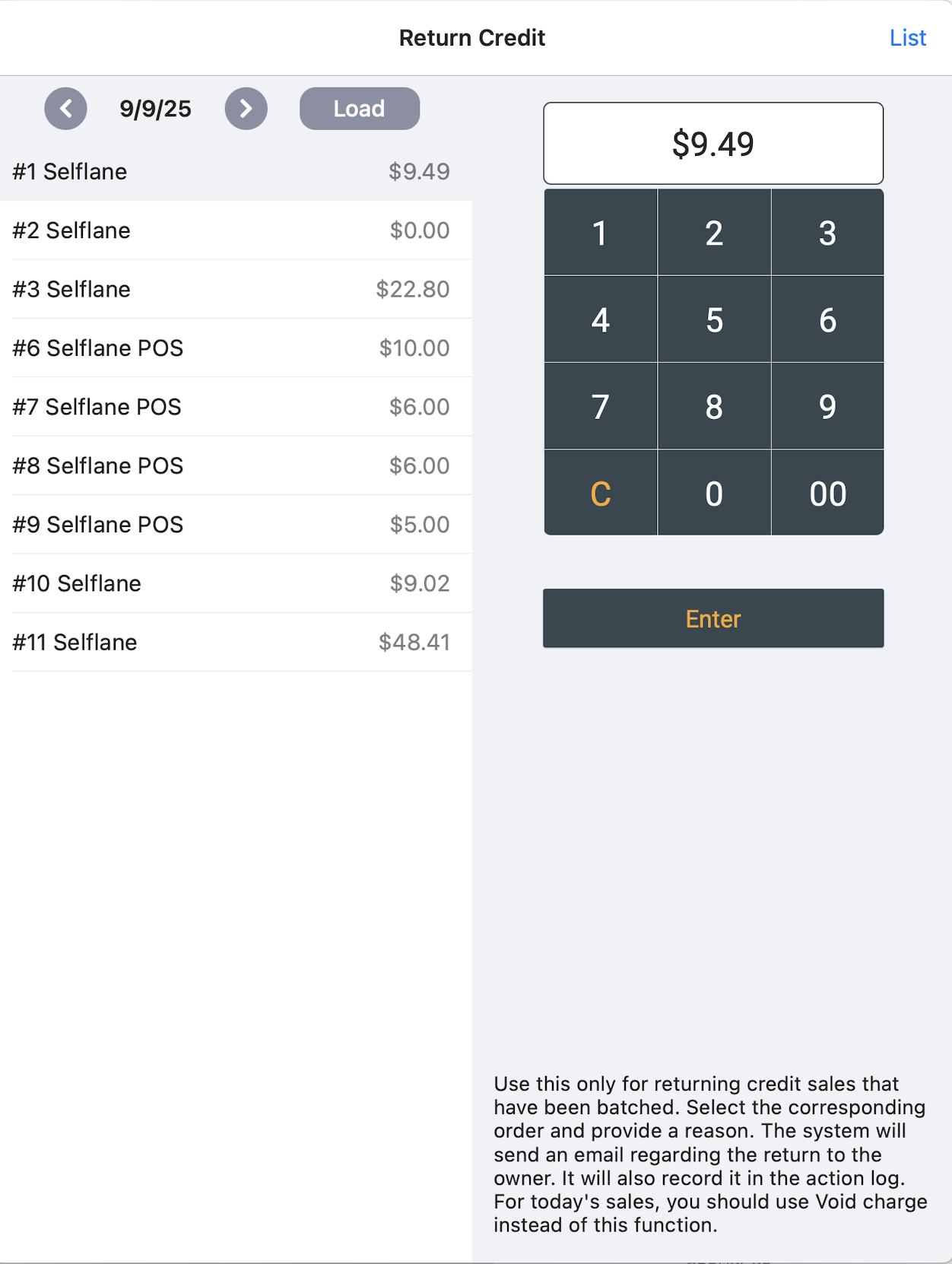
Return Credit. - Select the original order. The amount defaults to the order total; change it if the refund is smaller.
- Tap
Enter. - Ask the customer to present the card when the PAX terminal prompts for it.
Confirm the PAX terminal approves the return. The POS records it as a separate Credit Return and prints a Return Credit receipt.
MagTek reader
For an open batch, open the paid order, reopen it if needed, and tap Pay. Swipe left on the MagTek payment and tap Void Transaction. The POS sends a reference void and removes the payment from the order only after MagTek accepts it. The card is not needed again.
For a closed batch, a manager with admin access can refund the original MagTek payment without the card:
- Tap
Staff Self Service, select a manager with admin access, and enter the passcode. - Tap
Return Creditand select the original order. - Enter an amount greater than zero and no more than the original MagTek charge. The amount shown first is the order total, which can include other payments.
- Tap
Enter.
The POS needs an original transaction reference from one identifiable MagTek credit, debit, or gift-card payment. A successful refund creates a separate Credit Return record with the refund reference and prints a Return Credit receipt.
To void a recent MagTek credit return, open Return Credit and tap List. Swipe left on the credit return, tap Void, complete manager approval, then tap Void Credit Return. The POS voids the refund through MagTek before marking the record voided.
If the refund cannot be completed:
- Missing transaction reference: Do not try another order or payment. Contact Support with the order number and original payment details.
- Amount exceeds the original charge: Lower it to no more than that MagTek payment.
- Multiple MagTek payments or mixed terminal payments: The order-level
Return Creditscreen cannot choose a specific payment. Do not enter an arbitrary amount. Contact Support with the order number and original transaction ID so they can identify the right payment. - MagTek declines the void or refund: The reversal did not complete. Check the transaction in MagTek Payments before trying again or contacting Support.
- MagTek approves the refund, but the POS does not save the Credit Return: Do not submit it again, even if a receipt printed. Check the processor transaction first. Contact Support with the order number, amount, time, and any refund reference you have.
Do not use the order’s Partial Refund screen for MagTek payments.
Stripe reader or online payment
Use the order’s Partial Refund screen for an eligible Stripe reader or online payment. The customer does not need to present the card again.
- Open the order in the POS. Tap
Edit, thenPartial Refund. - Complete manager approval.
- If the order has more than one eligible Stripe payment, select the payment to refund.
- Enter a reason and an amount from $1 up to the order subtotal. Choose
Before TaxorIncluded Taxas appropriate. - Tap
Refund.
The POS limits this action to eligible orders within 24 hours. If Partial Refund is missing or the screen says Not Qualified for Refund, ask the owner or contact Support. Do not use this screen for PAX or MagTek payments.
Related links
- Void Payment — reverse a payment before its batch closes.
- MagTek Payments — check MagTek transactions and batches in Back Office.
- PAX Transactions — review terminal activity.