Member
Attach a customer to the Member Program so their order earns points or visits under your restaurant’s reward rules. You can find an existing member or sign up a new one from the POS.
Find a member
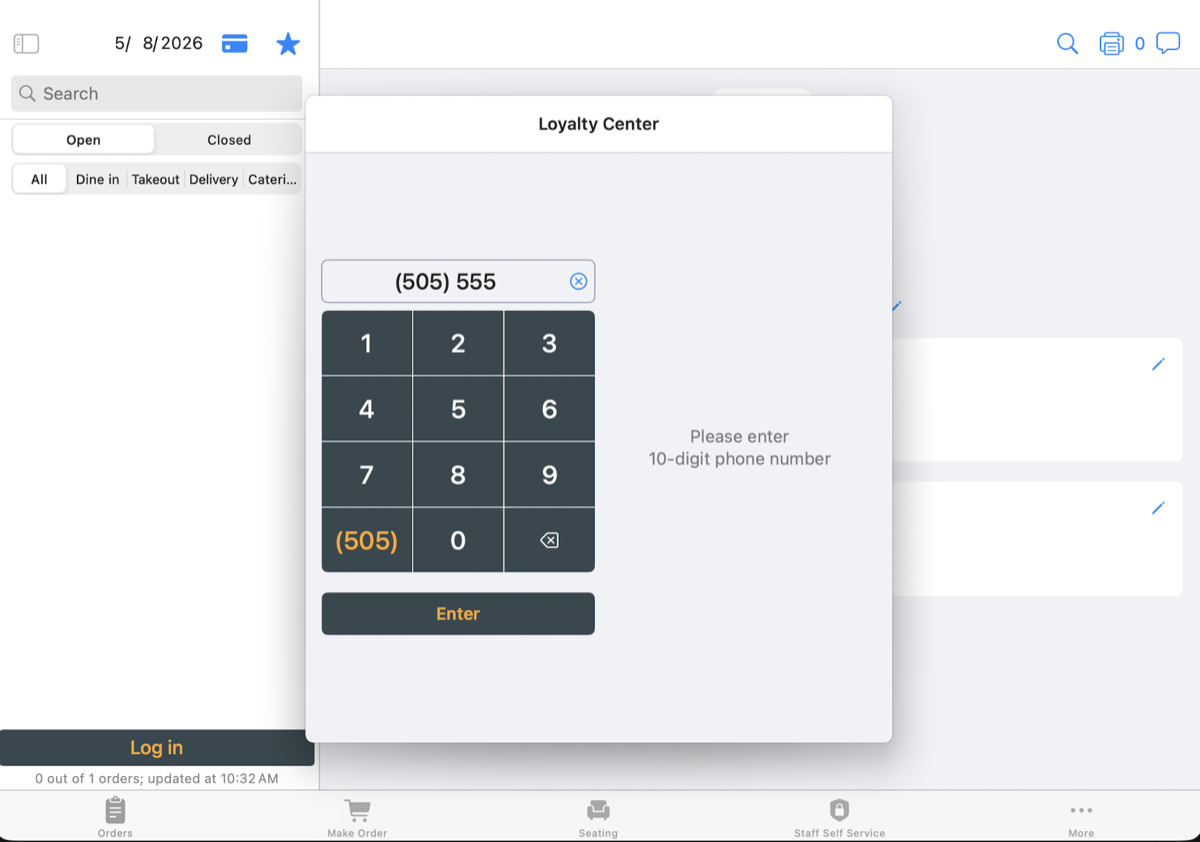
- Tap the star icon at the top-right of the order summary to open the Loyalty Center.
- Enter the customer’s 10-digit phone number and tap
Enter. - Choose the matching member to attach them to the order.
Create a member
If no member matches the phone number, tap Create a Member and enter the customer’s details.
The new member is attached to the order.
Opening the Loyalty Center and creating a member do not require manager approval. Reward redemption follows your restaurant’s approval settings.
Point rewards
For a points-based program, the member’s profile shows their points. Use available point rewards according to your restaurant’s rules.
Visit rewards at checkout
Visit rewards are available in Selflane POS 7.7.2 or later when your restaurant uses a visit-based Member Program.
- Attach the member to the order, then tap
Pay. - Choose the
Memberpayment method and tapUse Visit Reward. - Review their visit progress.
Reward readyindicates they have earned a reward. - Tap
Redeem $X.XX Reward, which shows the reward amount. Obtain manager approval if your restaurant requires it. - Review the remaining amount due and finish payment.
If the reward exceeds the amount due, the screen shows Extra $X won't be kept. Check with the customer before redeeming.
What if no visit reward is offered?
Check the visit progress on the payment screen. Visits to the reward shows how many more visits the member needs.