Business email with your domain
You can use addresses such as info@yourrestaurant.com while Selflane hosts your website. A domain and website do not include email mailboxes automatically.
Keep your website and add email
Your email provider uses DNS records to route email. These include MX, SPF, DKIM, and DMARC records. They do not change where your website is hosted.
When Selflane hosts your DNS, it can manage the records your email provider requires. If you connected your website using records at another provider, keep DNS there and ask Support for email setup guidance.
Choose an email setup
Choose the option that matches how your team needs to receive and send email.
| Option | Best for | What it does |
|---|---|---|
| Email forwarding | A simple public contact address | Sends info@yourrestaurant.com to an existing Gmail or Outlook inbox. Forwarding alone does not create a mailbox or always let you send as that address. |
| Amazon WorkMail | A full business mailbox with AWS-managed DNS | Gives each user a mailbox they can access through their email app or webmail. You can add aliases to route several addresses to one mailbox. |
| Google Workspace | Teams that want Gmail with their restaurant domain | Gives staff Gmail mailboxes at your domain. Google manages the Workspace account, while Selflane can add Google’s required DNS records. |
| Microsoft 365 | Teams that want Outlook or Exchange | Gives staff Exchange Online mailboxes at your domain. Microsoft manages the account, while Selflane can add Microsoft’s required DNS records. |
Your email provider sets its own account terms and pricing. Selflane does not provide or price a separate email product through this guide.
Understand mailboxes, aliases, and forwarding
A mailbox is a full email account. It has its own sign-in, storage, and sending address. Providers usually charge per mailbox.
An alias is an extra address that routes to a mailbox. For example, one mailbox for owner@yourrestaurant.com can also receive messages sent to info@yourrestaurant.com, catering@yourrestaurant.com, and jobs@yourrestaurant.com, depending on your provider.
Forwarding sends mail from one address to another existing inbox. It is useful when you do not need a new mailbox. Ask your provider whether it also supports sending from the forwarded address.
Know who manages what
Your restaurant or email provider manages the email account, billing, passwords, mailbox storage, user access, and day-to-day support.
Selflane manages your website. Whoever hosts your domain’s DNS manages its email records. Setting up email does not require moving your website or changing nameservers.
Set up Google Workspace email yourself
An owner can use the Google Workspace email card in the Back Office , under Settings → Domain. This setup is available for custom domains whose DNS Selflane hosts.
If your website uses DNS records added at your current provider, contact Support for Google Workspace setup. Connecting a website through A/CNAME records does not move its DNS to Selflane or enable this card.
Create your Google Workspace account and all receiving mailboxes first. Selflane adds DNS records; Google manages the mailboxes and billing.
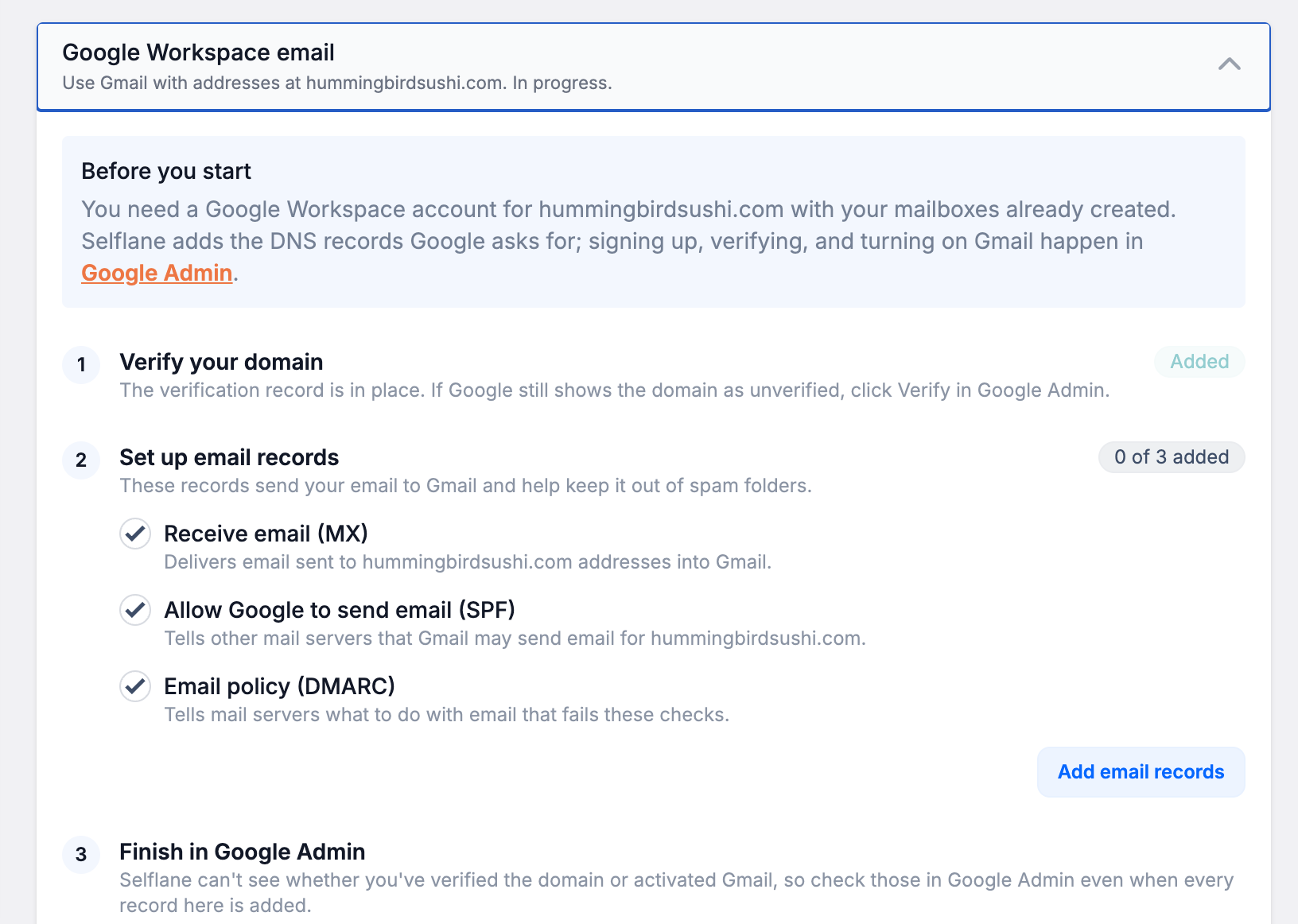
- Open the
Google Workspace emailcard. - In Google Admin, start domain verification and copy the full TXT value. Paste it under
Verify your domain, then clickAdd verification record. If Google gives you a CNAME instead, chooseGoogle gave me a CNAME record insteadand enter its label and destination. - Under
Set up email records, select the records you need and clickAdd email records. - Return to Google Admin to verify the domain and activate Gmail.
- Once Gmail is active, generate the DKIM key in Google Admin under
Apps→Google Workspace→Gmail→Authenticate email. - Paste the full key under
Sign email (DKIM)and clickSave key. Return to Google Admin and clickStart authentication.
Added confirms that a DNS record is present. It does not confirm that Google has verified the domain or activated Gmail.
If you already receive email through another provider, adding Google’s MX records moves incoming mail to Google. Create every receiving address before confirming Move email to Google.
Optional custom URLs let you use addresses such as mail.yourrestaurant.com. Add them in the card, then enable them in Google Admin under Account → Domains.
Ask Support about other email setups
Send Support the following information:
- Your domain name, such as
yourrestaurant.com. - Your chosen email provider, such as Google Workspace, Microsoft 365, or Amazon WorkMail.
- Whether you need full mailboxes, forwarding, aliases, or a combination.
- The addresses you want, such as
info@,owner@, andcatering@. - The DNS records or setup instructions from your email provider, if they gave you any.
Support can confirm the DNS changes needed for your provider. Keep control of your email-provider account so you can manage users, billing, and passwords.
Related links
- Site settings — manage the website Selflane hosts for your business.
- Basic Settings — update the public email address shown for your business.